BDM3d Mumbai · WhatsApp and email · Also: Dubai Tokyo Seoul Miami New York Toronto · Canada
BDM3dStudios
Sign in Start a project
Studio

One approved scene. Every season.

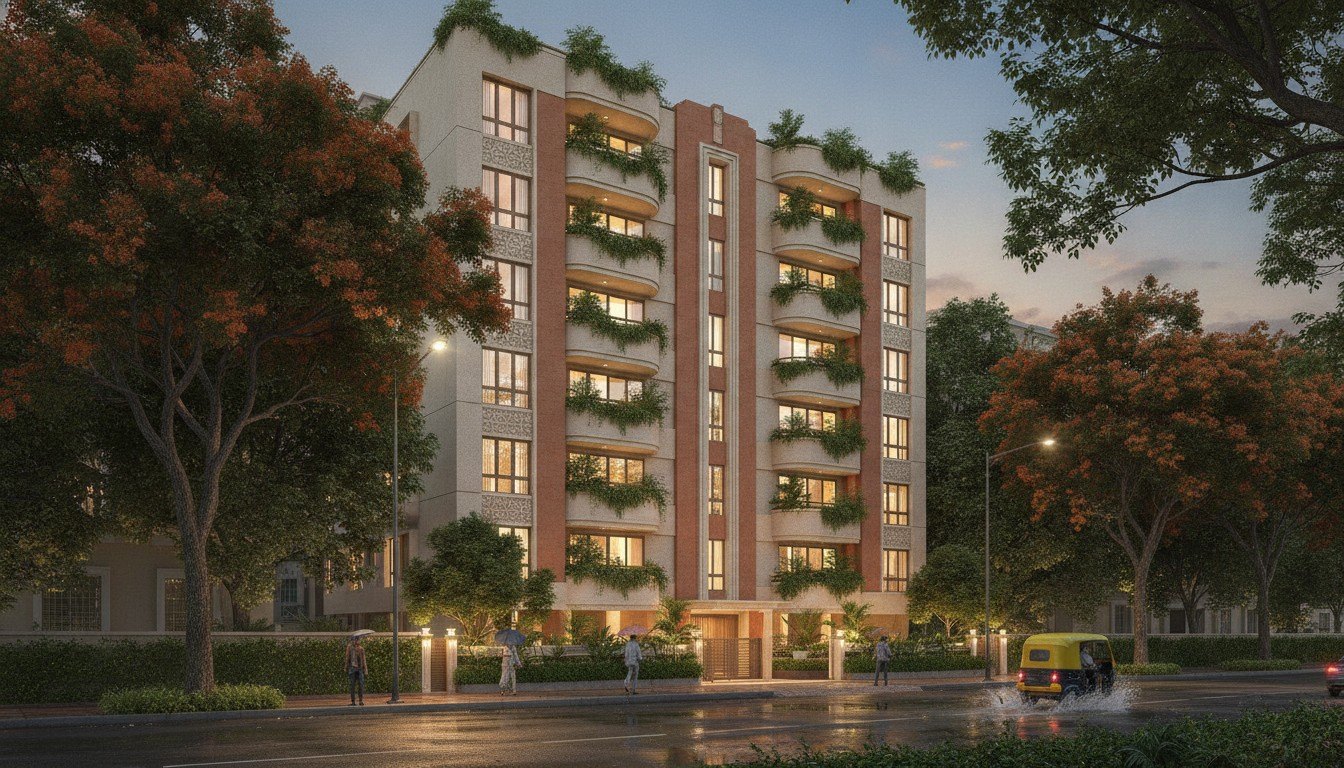
Once a scene is approved, AI makes the rest: spring and winter, dusk and morning, a busy street or a quiet one, stills that move. The building never changes. Only the light and the life around it.

Start a projectBook a 20-minute call
The 3D model is the source of truth. AI never moves a wall, adds a window or changes a finish. Every AI frame is checked against the approved scene before it's released.
What you get

What’s included.

  • ✓Seasonal and time-of-day sets
  • ✓Lifestyle and styling variations
  • ✓Image-to-motion clips for social
  • ✓Campaign refreshes without a new shoot
Who uses it, and when

AI is for variations, after the building is right

AI visualization earns its place once a scene is approved. Marketing teams use it to turn one approved view into a winter set, a dusk set, a busy Saturday and a quiet morning, without ordering new renderings for each. Sales teams use short image-to-motion clips for social posts between campaigns. Developers on a Model Only order sometimes run AI over an accurate model themselves to explore looks early, knowing the model keeps the building true.

What AI should not do is design the building. Image generators are good at atmosphere and poor at geometry: left alone, they add windows, change railing spacing and invent balconies. That is why the order matters. The true 3D model comes first, from the drawings. AI works on top of it, and only on light, season, landscaping, styling, people and motion.

The guardrail

What AI may change, and what it never touches

  • ✓May change: time of day, sky and weather, season, planting colour and fullness, interior styling, people, cars and street life, subtle camera motion.
  • ✓Never changes: walls, windows, doors, balconies, rooflines, heights, setbacks, materials and finishes, unit layouts, views that a buyer is being sold.
  • ✓Always checked: every AI frame is compared against the approved drawings and the approved scene before release. Frames that drift are corrected or discarded, not released.
What goes wrong

The risks with AI imagery, and how to manage them

What it costs

Geometry drift

A generated image adds a window or widens a balcony. If it reaches marketing, buyers are shown a home that won't be built.

How it’s solved

The building always comes from the 3D model. Each AI frame is checked against the approved drawings before release.

More →
What it costs

Sets that don't match

Spring from one tool, winter from another, and the brick changes colour between them.

How it’s solved

Every variation starts from the same approved scene, so materials stay constant across the set.

More →
What it costs

Marketing that overpromises

In BC, presale marketing sits alongside the disclosure statement required under provincial development marketing rules. Images that misstate the project create risk for the developer.

How it’s solved

AI handles atmosphere only. Anything that shows the building matches the approved drawings. Check wording and disclaimers with your lawyer.

More →
What it costs

No record of what was generated

Nobody can say which image was approved, or what it was made from.

How it’s solved

Each variation is a version in StudioLink with its source scene, reviewer comments and approval.

More →
How it's made

From approved scene to released variations

01

Lock the source

The base view must be approved first, built from your drawings (CAD, Revit, SketchUp or PDF), finish schedule and landscape plan.

02

Brief the variations

Tell us the seasons, times of day, styling and channels. A campaign calendar helps us plan sets rather than one-offs.

03

Generate

Variations are produced on top of the rendered scene, with the building held fixed.

04

Check against the drawings

Each frame is compared with the approved scene. Anything that moved is fixed or dropped.

05

Review and approve

You mark up the set in StudioLink and approve what goes out.

06

Release

Approved variations join the library, tagged with the scene they came from.

Reviewing together

Who checks an AI set

RoleThey need from youYou need from themOn one record

Architect

They need from you

Assurance the design is unchanged in every frame.

You need from them

A quick look at the set before it goes public.

On one record

The architect can review the set against the approved version side by side on the same record.

Marketing agency

They need from you

Variety for the campaign calendar.

You need from them

The calendar and the tone for each season.

On one record

The agency briefs and comments in StudioLink rather than generating its own images off-record.

Sales team

They need from you

Current images that match what buyers see in the sales centre.

You need from them

Feedback on what buyers respond to.

On one record

Approved sets update the web tour gallery, so every channel shows the same season.

One scene, every use

More from the scene you already approved

AI variations are the cheapest way to keep a campaign fresh because the expensive part, the accurate model and the approved view, is already done. A launch in spring can run a winter set in December without a new rendering order. The same approved scene still feeds the renderings, the film and the tour, so every channel stays consistent. When the design changes, the scene updates first and the variations are made again from it, never patched by hand.

A practical tip: brief your variations as a set, tied to your campaign calendar, rather than one at a time. Sets are easier to check and to keep consistent.

Keep reading

Questions

Will buyers be misled?+

No. Anything that shows the building is checked against the approved drawings. AI only handles atmosphere.

Is it cheaper than new renders?+

Variations from an approved scene take less time than new views. Your scope shows the difference.

Is AI-generated architectural imagery accurate?+

It depends how it is made. When AI generates the building, it often changes it. We build the building from a true 3D model and let AI change only light, season, styling, people and motion, then check every frame against the drawings.

Can AI change the season in our rendering?+

Yes. Once a view is approved, AI can produce spring, summer, autumn and winter versions from it, with the building held fixed.

Will buyers be misled by AI images?+

They shouldn't be, if the building comes from the model and every frame is checked. Keep your usual disclaimers, and check presale marketing wording with your lawyer.

Is AI visualization cheaper than new renderings?+

Variations from an approved scene take less time than new views. AI options are charged per use, and your scope shows the difference before you commit.

Can I run AI on the model myself?+

Yes. A Model Only order gives you an accurate model to explore with. Anything you want released under our name goes through the same check.

Can AI turn a still into video?+

Yes. Image-to-motion clips work well for social. For longer sequences or camera moves through the building, a rendered film is the right tool.

Can AI add furniture to an empty interior?+

Yes, as styling. For styled sets aimed at different buyers, see staging.
Panoramic twilight rendering of a new community

Concept to keys, and beyond.

Tell us where your project is. We'll tell you what it needs, and show you the scope before we start.

Start a project Book a 20-minute call